You can now ask the AI to write special HTML/XML for the manuscript editor:
If you ask it to write <nc-section data-title="Alternative 1">Write a possible alt. version here</nc-section> it will now properly show up as its own section! This makes prompts that suggest changes easier to grasp in terms of its results.
The following attributes are supported:
data-title will change the title/label of the section
data-color will change the color (red, blue, green, …)
For example:
Instructions
Please rewrite the given text 3 times and output your proposed changes in the following format:<nc-section data-title="Alternative 1">Write a possible alternative version here.</nc-section><nc-section data-title="Alternative 2">Write a second possible alternative version here.</nc-section><nc-section data-title="Alternative 3">Write a third possible alternative version here.</nc-section>
This change also helps with a specific bug around using AI in or near blockquotes.
Other changes
Other than that, this one’s a quick bug fix release as there was an issue with importing novels that was introduced in the last release. The importer would just silently fail.
Added act.number, chapter.number and scene.number functions to get a number (instead of a full title) of where you are in the story.
Additional Changes
You can now leave a series or novel you’ve been invited to on your own - no need to have an active subscription or ask the owner to remove you
Fixed codex mentions being interpreted as underlined when copied from chat messages (This only happened on Chromium and WebKit (Safari) based browsers)
New Monospace Font: Courier Prime. This one’s a more modern variant for those who love the classic
Fix gap cursor not being visible in dark mode (for adding text before a beat when at start of a scene)
This release contains a ton of fixes when importing novels as .docx (Word) or .md (Markdown) and also adds HTML export and import support!
Improved detection of empty scenes during import
Improved heading detection for chapter and novel titles
Fixed issues with images not being stripped properly (we don’t support images yet, but stay tuned)
Fixed styling issues when using the importer in dark mode
Added internal support for incorrectly/malformed markdown where some scenes were imported as one big paragraph
Other various improvements
We’re always happy to help if you encounter any issues with bringing your words into Novelcrafter. Big thanks to those that provided us with files that didn’t work (contact us via support in those cases), so we could improve the process for everyone!
Custom Prompting
As always, we added a couple goodies for our power users:
You can now access the labels on a scene via scene.hasLabel and scene.labels
Added new scene.hasSummary and scene.hasContent calls
Added codex.getWithReferences to get a full list of all nested references alongside the initial entry.
Other Changes
Fixed nested menus in floating chat windows not working properly (flickering and unable to click items)
Fixed being unable to delete novels without an active subscription
Improved image caching - let’s hope they stick around this time (fingers crossed!)
Fixed plan view search not keeping proper scene numbers in grid mode
Today, Anthropic released their new Claude 3.5 Sonnet model (see their release notes here). This release adds the model to all system prompts. In case you have custom prompts, you have to do so manually.
This new version of Sonnet is the same price as before, but outperforms the 5x as expensive Opus model! Same context size as before (200k tokens), but it can remember things much better! It also loves to write a lot more, so if you found Sonnet to produce very short prose, this new version might be right up your alley.
Workshop Chat
This release fixes tons of issues around rendering messages in the workshop chat. Code blocks are no longer appearing, and tables are also rendering properly now.
For those having very long threads, the chat will also now limit the number of messages that are on display. You can load in more as needed, but it only shows the last 30 messages by default now.
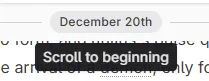
The divider showing the date for long running threads can now be clicked, so you can quickly jump to the beginning of that date.
The message extraction also saw some love and covers a couple more cases where it picked up nothing or content incorrectly. As always, please report any issues in case it doesn’t extract things you expected it to pick up!
Custom Prompts
This release also adds a ton of new instructions you can use in your custom prompts, and contains a couple new keywords to speed things up:
The new “in” operator can be used to check if one text contains another text:
Instructions
{#if("START" in context.sceneBeat)}(do some stuff here){#endif}
You can now add numbers or concatenate text with the + operator: 3 + 4 or "Hello, " + "there!"
The prompt editor now shows the auto-complete window more reliably, and the tooltips and info for each function have been improved. Some methods now have information about their parameters, as well as examples for how to call them.
New function calls:
context.codex.getAdditions returns just the additions to a codex entry based on the scene you’re in
New calls for chapters and acts! Use chapter.title to get the current chapter title, or act.summary to get the summaries of all scenes within the act. These also apply to new calls to context.previousChapter, context.previousAct, context.nextChapter and context.nextAct.
string.wordCount can now count words in the given text in case you need it (this is dependent on the language your novel has been set to)
Other
Performance optimizations for detecting codex entries
Some visual overflow bugs were fixed
Fix being stuck with a loading screen if a novel can’t be loaded due to an unknown error
Fixed a markdown export bug for novels that got imported - some scenes appeared as a single paragraph in those cases
On Monday, we released a survey about the state of the Novelcrafter interface (You can visit it here if you missed it). Based on initial feedback, we added a couple goodies in this release!
But first off…
Time for cake 🎂
The very first lines of Novelcrafter have been written on June 8th 2023 (does that count as a “birth day”?) While the actual release took quite a while longer, this is where it all began. We’re grateful for all the support and wonderful times so far!
Organize your Prompts into Submenus/Folders
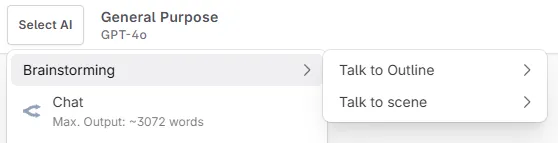
Yes, you heard right. This release adds the ability to manage your prompts a lot better. Based on the initial survey data, people that accumulated a large collection of their own prompts are having trouble organizing it all.
You can read more about it here: https://docs.novelcrafter.com/en/articles/9418856-organize-your-prompts-into-submenus
To put your prompts into sub-menus, use a “/” to denote their path:
Fiction / Urban Fantasy / Crazy Prose
NSFW / Romance / Good Times
While the prompt manager does not support actual folders (yet!), the menus should now be a lot cleaner!
The new system also allows “one-click” selection of prompts that only have a single model. This was a feature that was previously limited to the text replacement prompts, but now is available in all other places as well.
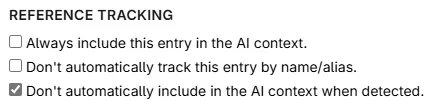
Detect, but don’t include, Codex entries in AI
The “references” tab got a new checkbox to not include an entry even though it’s being detected. You can still have it be included by manually adding it to a scene, or by having it be a nested entry.
One example use case where this comes in handy: You have an entry named “hell”, but you don’t want to pull it in whenever someone says “what the hell”. Now you can decide where and when that entry gets pulled in (e.g. nest “hell” under “demons” so it only pulls “hell” in if a demon gets mentioned).
Other changes
The firstWords and lastWords functions are now available for all scene calls
Fix edit buttons missing in the outline and matrix views
Fix visual bugs with longer codex names overflowing their elements
Added support for importing a novel as an “outline” (so it will only fill out the summaries instead of contents)
Added support for cloning codex groups from a novel template
Further fixes regarding sorting things alphanumerically by name (prompts, codex entries, …)
Added snippets.has to check if a snippet with that name exists
Added codex.has to check if a codex entry with that name exists
Added codex.getNotes to get the notes for a specific codex entry
Added codex.getDescription (and context.codex.getDescription) to only get the description for a specific entry
Added context.previousBeat and context.nextBeat functions for more control over prose generation
Added subtitle function to all scene calls (e.g. context.previousScene.subtitle)
Added context.previousSceneSamePOV and context.nextSceneSamePOV to get the previous/next scene that matches the current POV. Helpful for his-and-her stories.
Other changes
Added support for filtering your codex by a specific tag
Added GPT-4o and the Claude 3 models as supported models for character extraction
The nested entries section now checks how many deeply nested entries there are, and will inform you if it’s more than 3. This helps pinning down entries that accidentally pull in the whole jungle, even though you only wanted a single banana.
Added line-wrapping to codex addition lists (applies to codex entries and matrix views)
Added support for Open AI Project IDs via APIs (they’re a legacy feature but …)
When discarding an AI text replacement, the original text will be highlighted again
The “Apply/Retry/Discard” bar will now stay in view just like the bubble menu
Make scene dividers optional during export
Fixed some issues around handling subscribers when still in trial mode
Your exact subscription plan name will now show up under billing settings (previously it only showed the tier/level)
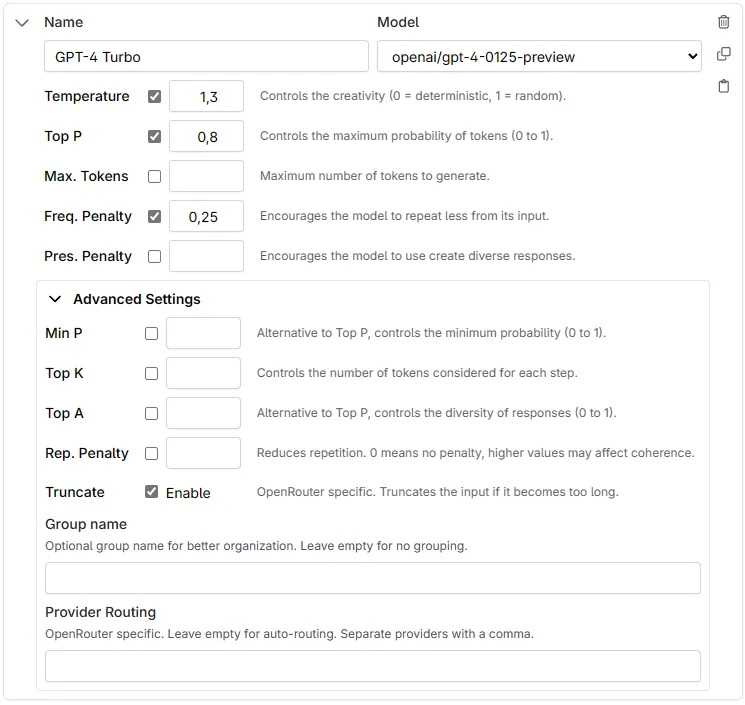
The new panel includes descriptions for each setting as well as has a couple more advanced settings now.
You can now copy and paste individual model settings!
Each model parameter now has more room for the input box, and also has a short description for what it does
Added new OpenRouter-specific setting to disable prompt truncation
Added new OpenRouter-specific setting for custom provider routing. Some model providers might have worse performance than others, so this lets you control where the request goes to.
Other changes
You can now delete custom codex categories (It’s time to say goodbye to “Test 123”)
Added support for uploading (codex) images from clipboard (no support for Firefox due to technical limitations)
Fixed a race condition in the loading screens (sometimes it got stuck at petting the unicorns. Sorry!)
Compressed the text for clipboard prompt sharing even more. This should make it easier to share things via Discord.
When creating a new prompt from the clipboard it now gets saved immediately.
Added a little “scroll to bottom” button to the workshop chat
OpenAI has unveiled their latest iteration on GPT-4 this Monday; a faster, cheaper and more capable model from the GPT-4 family.
It has a lot better recall, which is a perfect fit for the Codex as it will include more nuanced details.
New Model: Gemini 1.5 Flash
Just one day later, Google has released their latest updates to Gemini. The 1.5 Flash model is faster, cheaper but kept its 1 million context window!
It’s meant for small tasks like summarization, quick ideation and text rephrasing/expansion/… and more!
AI model list updates
The new models have now been added to all AI actions. At the same time, these lists have been cleaned up (with help from our internal statistics):
We’ve removed models that saw barely to no usage (e.g. the original GPT-3.5),
Reordered the list by popularity,
Added new models that have risen the ranks (e.g. Cohere CMD-R+, lzlv and Wizardlm2)
As always, if you used a cloned system prompts, or totally custom ones, this won’t affect you.
One new feature that you’ll notice is the grouped models. There are now groups for popular, NSFW, and others. This should help newcomers figure out which models to try first - and allow existing users to organize their model lists.
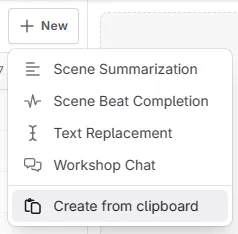
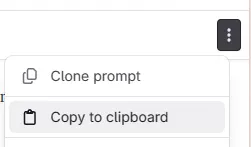
Share prompts with others via Clipboard
Custom Prompts are essential to the workflow in Novelcrafter, and our community is always sharing new and inventive ideas with others, but sometimes adding them to your own collection can be daunting.
This release adds the ability to copy a full prompt (including instructions, model settings and more) into your clipboard (in a shareable format) that can be imported by others. Like QR-Codes, but bigger.
Faster app starts for people on 3G
Some internals have been moved around to allow faster load-up times for people that are on mobile or slow networks. Please report any issues if you encounter them after this change.
Other Changes
Your “left off” list of novels is now the last 3 novels (instead of just one). In addition, it will only show up if you have more than 3 novels in your account.
You can now load in older entries of the full revision history (there’s no limit to the history!)
The revision history now shows the marker timeline as well (so you can see highlighted changes through time as well)
Anthropic Beta Models (only available via OpenRouter) are no longer detected as moderated and unsuitable for NSFW content
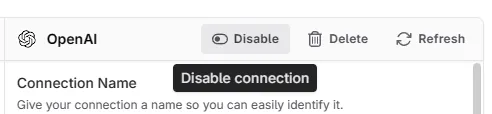
You can now enable/disable your AI connections in your settings. This is helpful if you want to keep their settings without a full removal.
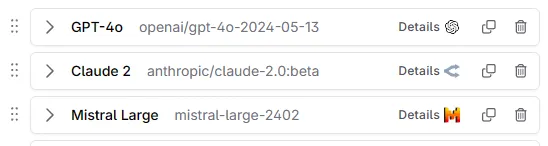
New “Details” button next to models in your prompting settings. These buttons will open the documentation for the vendor that’ll serve the model
Improved accuracy of Model detail texts in menus (when choosing which model to use). Things like estimated output size is more clear now.
Internal improvements to text rendering (e.g. searching descriptions or titles in the sidebar, should be faster now).
When searching through chat it now takes messages into account as well (previously just the titles were considered)
Your number of messages in a thread are now shown in the sidebar/thread list
Empty chat threads are now more visually distinct in the thread list
When chatting with a scene, all additions with that scene are now considered as well (previously only additions right before the scene were added to context)
Scenes marked as “AI excluded” are no longer included in the “full novel” context
Other updates
When updating a novel cover, the novel switcher (to navigate between books in the current series) now shows the new cover as well
Added a new “full width” page width option to manuscript format settings
Added the ability to remove novel cover images
Revision tracking is now being done in 3-minute slots (previously, changes within 4 minute windows were merged). This will give you a more incremental history of your changes.
Additional fixes for images disappearing due to invalid cache headers