Novelcrafter

Changelog

What's new in Novelcrafter

Follow the latest features, improvements, and fixes as Novelcrafter evolves.

  1. August 13th, 2024

    Improved Fixed Chat Codex Prompts Snippets

    Archive (almost) everything

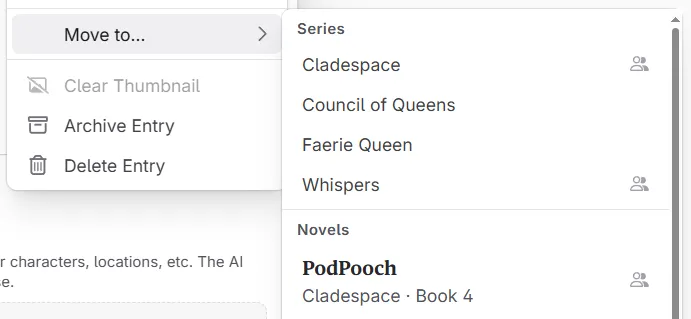
    Novels, codex entries, snippets and chats can now be archived and restored. Don’t want to delete them right away, or declutter your content? You can now archive them and bring them back any time.

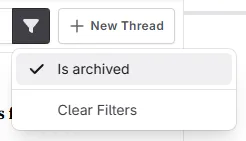
    If you want to see your archived content, look for the funnel/filter button: image

    You can see a detailed guide over on our documentation: https://docs.novelcrafter.com/en/articles/9733992-archiving

    This also means that archived novels are hidden by default on your home screen (clear the filter, or toggle to “archived” to view them again).

    Custom prompts

    After some further testing, we are now including the name of the character for each scene in the novel outline. When using chat you can now talk about his & her stories or other setups with either single POVs or alternating viewpoints!

    This release also fixes indentation issues in prompts - any indentations or extra spaces at the start of the line are now kept all properly (this should improve AI prompt adherence in some cases). This is helpful when you have multi-level markdown lists for writing rules in your prompts.

    Other changes

    This release also contains a couple important bug fixes:

    • Fixed the ‘unknown’ environment banner appearing when it shouldn’t
    • Fixed the codex matching not working after weird whitespaces, or at start of lines within chat
    • Fixed “continue where left off” novel covers being too big on the home screen for mobile users
    • Fixed custom codex categories still being visible after deletion (until reload)
    • Some other little bug fixes and tweaks
  2. August 5th 2024

    Improved Fixed Chat AI Import

    Novel Outline Updates for Chat

    For those who have experienced issues with AI not recognizing or miscounting scenes/chapters, this update should significantly improve the experience:

    The internal structure for the “Include novel outline” feature has been updated to use a more structured approach (XML instead of Markdown). This should help guide the AI when discussing specific acts, chapters, or scenes. We’ve also made scenes with content but no summary visible to the AI, preventing it from underestimating the number of scenes in your story.

    A new use case now possible:

    1. Create a new, empty novel
    2. Apply a template from the “Create from Outline” feature
    3. Open a new chat and select “Novel Outline”
    4. Ask the AI to populate your outline with an idea
    5. The AI should now use the exact act and chapter names, as well as the precise scene count from your plan view

    If you prefer the old behavior for your custom prompts (although we consider this a major improvement), you can change your novel.outline call(s) to novel.outline("hierarchical").

    Other chat updates:

    • The Chat prompt preview no longer requires a message and works with a blank message
    • Changing the prompt and/or model for a new chat thread now properly saves it as a new chat (this was already the case, but empty chats were only visible after refreshing the page or reopening the novel)
    • The chat will now show a little “knowledge cutoff” warning so you know which messages will actually be sent to the AI.
    • Fixed some minor issues with chat extraction involving nested lists
    • Resolved interactivity inconsistencies when accessing chats in shared novels or subscription plans without workshop chat

    Import Improvements

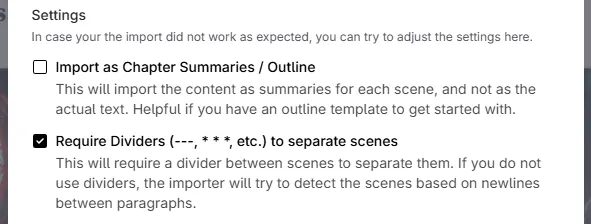
    We’ve updated the novel import dialog, including a new setting to enhance imports for users who only use scene dividers. New help text has been added to better explain the options.

    image

    For those that don’t want to bother with titles and the like, and only have a single-chapter novel, the importer now supports those as well!

    Other Changes

    • Fixed the “[…] maximum context length […] However, you requested about […]” error caused by a recent internal change in OpenRouter
    • Resolved an issue where an extracted chapter, when added to your outline, would not save correctly and would lose its association with the act upon page refresh
    • The export button now always appears when the sidebar is collapsed
    • Implemented additional performance optimizations for writing in scenes
    • Fixed visual issues with some dropdown menus not overlaying content properly
    • Various other fixes and improvements
  3. July 31st 2024

    Improved Fixed Write Prompts

    𝑻𝒉𝒆 𝒎𝒐𝒏𝒕𝒉𝒍𝒚 𝒎𝒖𝒔𝒆: August Writing Bingo 🌻📝

    We got something exciting to share with you: going forward, every month, we’ll send out a new, interactive theme machine for writing prompts and more.

    For August, we prepared a fancy Bingo grid. It’s there to help you find new and exciting ideas and hone your writing skills along the way. Choose a row or column yourself, use the randomizer, or take a chance with the chaos button! Play around with it here: https://monthly-muse.com/1 (you can also reach it via the NC website.)

    If the theme machine doesn’t come up with something great, we also included some creative sparks for more fresh ideas.

    Updated Model Lists

    We cleaned up the current model lists for the system prompts and finally added GPT-4o mini! This should make longer chat sessions a lot more budget friendly.

    In addition, this release includes the following bugfixes and such:

    • The “start writing” placeholder should no longer appear where you couldn’t actually start typing
    • Fixed an internal editor issue where any ellipses and em-dashes would not be replaced properly
    • Fixed an issue with when entering simplified Chinese into text boxes, the text would appear as traditional Chinese.
    • Fixed some layering glitches with the scene actions menu in the manuscript page
    • Various other bug fixes
  4. July 29th 2024

    New Improved Fixed Chat Prompts AI

    Chat Prompt Preview

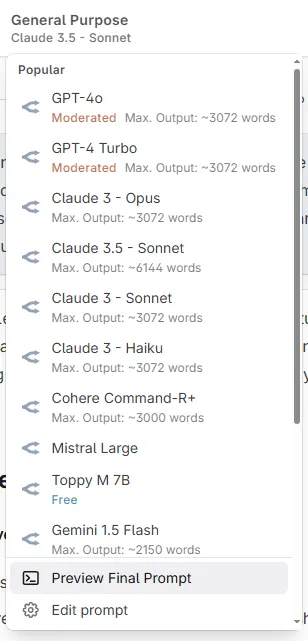
    The long awaited chat prompt preview is here! You can now see what gets sent to the AI when entering a question/message. You can access the prompt preview button from the model switcher in the chat thread header (next to “Select AI”).

    image

    Custom Prompts

    For some, the custom prompts can be a bit daunting to look at when unfamiliar with programming languages. So we added support for comments inside your custom prompts! The system default prompts now have a couple to tell you, what each section does.

    To wrap text in a comment, wrap it in {! and !}, like so: This is some text {! and this is a comment !}.

    That way you also can just disable certain functionality from your prompts, without having to remove it altogether.

    • Added support for underscores in numbers, so you can now write 2_000 to make it easier on the eyes
    • Added support for ‘dangling’ commas in prompt functions, so it no longer breaks when you write codex.get("name",)

    Other Changes

    • Fixed a bug where older codex entry versions might have been used for AI generation. In case you got weird output lately, this might have been the cause.
    • Nested entries of codex entries directly attached to a scene will now be included as well. This is how it always should’ve worked, so we count this as a ‘bug fix’.
    • We now cache the OpenRouter model list so that, in the case there is downtime/are issues, we should have a working copy (fingers crossed!)
    • The default scene summarization prompt has been tweaked to not glitch into the scene’s POV for writing (it should now always write in third person, present tense.)
    • Other various fixes and improvements
  5. July 27th 2024

    Improved Fixed Write Codex AI Export

    Minor updates to the novel exporter

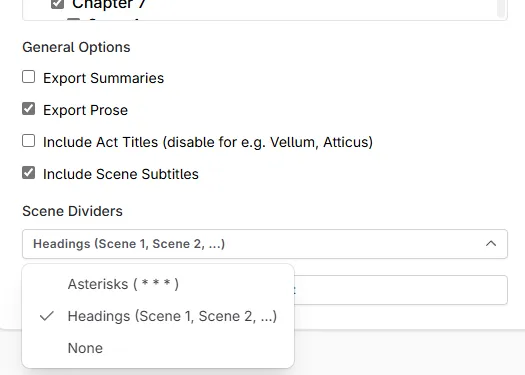
    image

    • Scene Dividers can now be set to “none”, “asterisks” and “headings”. The latter is new, and simply adds a new heading with the scene number
    • For those with a lot of scenes/chapters, the export window is now scrollable, so it’s easier to quickly export your book in one go

    Other changes

    • The “continue where you left off” function will now actually remember your last state. No more re-creating your previous set up!
    • Any search box now holds for a bit until you’re done typing. This should improve performance for those that have a lot to crawl through
    • Fixed some issues around sectioning off AI generated text
    • The editor will now reserve an empty paragraph after sections, beats and more. Sometimes you couldn’t get out of one of these boxes.
    • Fixed a special case where the “+”-button next to a codex heading would not open a new panel (for novels that aren’t part of a series)
    • Other various fixes and improvements
  6. July 22th 2024

    New Improved Write AI

    Performance updates

    This update contains a ton of performance updates that reduce the number of updates the app does as you work. Editing codex entries should now be smoother/faster, as well as using AI actions should now be a lot faster as well (less choppy/lagging).

    Manuscript scene hopping

    While you were able to say “remember where I left off”, that only applied to the exact scene and position, but not how your write view looked like. So going back to it, you always ended up back with “everything”. This was annoying. So we fixed it.

    You can now always go back to exactly where you left your manuscript, which should help a lot with larger projects.

    AI interactions revamp


    msedge_nr3qnsPlRP

    As some of the performance issues stemmed from the AI interactions, this aspect has been updated and visually overhauled, which in turn made a couple goodies possible!

    1. You can now undo/redo any AI text replacements! This also means that if you hit “retry”, you can now go back to a previous generation in case you liked that one better.
    2. You can now see your generated word count. This will only show the generated words, so if you you start to cut and edit the text down, this won’t update.
    3. There’s a new button to stop your generation. You could already do this by hitting “Apply” pre-maturely, but that also… applied the text. So this new “Stop” button gives you a bit more choice and clarity.
    4. Another new button to put your generated text into a section. By default, this uses the model name that generated the text as its title.

    And yes, this update also fixes the issue of the apply/retry/discard buttons being stuck or keep floating around. That was indeed quite annoying.

    Other Updates

    • When opening just a specific scene in the manuscript, the manuscript switch menu will now show which chapter you’re currently in (the relevant chapter will have a little dot next to it)
    • The listing for models on OpenRouter will now retry intelligently, if there was an issue grabbing the data
    • Fixed a couple issues when a prompt function does not receive a required argument
    • Other various fixes and improvements
  7. July 17th

    New Improved Fixed Codex Prompts Import

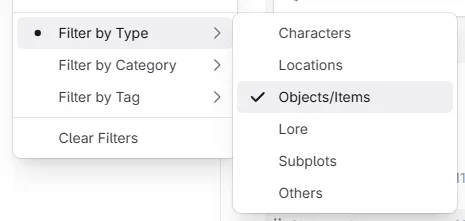
    Codex Filter improvements

    You can now filter your codex by both, types and custom categories! image

    Custom Prompts

    • There’s now novel.title and novel.author for those that need it
    • Fixed some issues around AIs generating empty HTML blocks when asking for nc-section.
    • You can now use curly braces in your own prompts, without them trying to be interpreted as instructions! So things like: Please use the text {{wrapped in curly braces}} as guideline for.... will no longer throw an error

    Other Changes

    • Resolved an issue where novels that got too big couldn’t be imported. We upped the limits, so a 200k word monster should now have been tamed just fine.
    • Codex entries that have “unknown relationships” (like if you still reference another entry from a series you no longer have access to) will now list those relationships so you can delete them if needed.
  8. July 15th

    New Fixed Prompts Import

    Custom Prompts

    You can now ask the AI to write special HTML/XML for the manuscript editor:

    If you ask it to write <nc-section data-title="Alternative 1">Write a possible alt. version here</nc-section> it will now properly show up as its own section! This makes prompts that suggest changes easier to grasp in terms of its results.

    The following attributes are supported:

    • data-title will change the title/label of the section
    • data-color will change the color (red, blue, green, …)

    For example:

    Instructions
    Please rewrite the given text 3 times and output your proposed changes in the following format:
    
    <nc-section data-title="Alternative 1">
    Write a possible alternative version here.
    </nc-section>
    <nc-section data-title="Alternative 2">
    Write a second possible alternative version here.
    </nc-section>
    <nc-section data-title="Alternative 3">
    Write a third possible alternative version here.
    </nc-section>
    

    This change also helps with a specific bug around using AI in or near blockquotes.

    Other changes

    Other than that, this one’s a quick bug fix release as there was an issue with importing novels that was introduced in the last release. The importer would just silently fail.

  9. July 11th 2024

    Improved Fixed Write Export Series

    Mostly a bug fix release, to improve overall usability and stability.

    • When an act has too many chapters, the manuscript selector now puts the chapters in a sub-menu
    • Fix visual overflow issues with long series titles in series selector
    • Fix visual overflow issues in the archive modal which hid the insert/delete buttons
    • Hide the “load more” button in the revision history modal when no more entries are available
    • Removed the default 2pt margin for paragraphs in docx export
    • In color selection menus, the current color is now being checked (previously there was no indicator)
    • When typing << or >> they will not get replaced with their typographic counterparts (very helpful for people writing with a Guillemet quotation style)
    • Some other bug fixes and improvements
    Edit: There were a couple issues regarding images disappearing again, those should have been fixed now.

  10. July 7th 2024

    Improved Fixed Write Prompts

    Custom Prompts

    • Added scene.hasSubtitle function(s)
    • Added act.number, chapter.number and scene.number functions to get a number (instead of a full title) of where you are in the story.

    Additional Changes

    • You can now leave a series or novel you’ve been invited to on your own - no need to have an active subscription or ask the owner to remove you
    • Fixed codex mentions being interpreted as underlined when copied from chat messages (This only happened on Chromium and WebKit (Safari) based browsers)
    • New Monospace Font: Courier Prime. This one’s a more modern variant for those who love the classic
    • Fix gap cursor not being visible in dark mode (for adding text before a beat when at start of a scene)
    • Various other fixes and improvements