Why I love the Codex
- Reading time
- 4 min read
- Written by
- by Kate
I talk about the Codex a lot during streams… Probably too much, if we’re being real. But I’ve tried notebooks, spreadsheets, sticky notes on the wall, and the Codex is the first tool that actually replaced all of them. If I could only keep one feature in Novelcrafter, it would be this one.
Searching for My Organization Solution
A little background to my story organization woes.
When I was a child, I would cram notebooks with story ideas. Characters, bits of scenes, miscellaneous ideas. These notebooks would be stuffed with loose bits of paper, and color coded paper tabs. A metaphorical bible of my world-building, if you will. Safe to say, going back to any one idea was hard. Yellow tabs meant characters but… what story had I meant this character for?

Then, I got my first computer, and things were a little easier. Instead of notebooks, I had extensive folder systems, nesting characters, chapters, notes all in subfolders. But with every chapter its own document, reading through large swathes of my story at once was nigh on impossible. Either I’d be searching for which tab had the next chapter, or I’d be waiting for a document to load, which took me out of the immersion.
Yes, I could have had everything in one document, but this was back in the days where long documents slowed down my hand-me-down computer, and the lag was insufferable.
Thankfully, as time went on, technology developed. I moved to Scrivener. For years, I loved it. But then I started looking at all the buttons I never used (and kinda scared me!), and realized that I still did lots of my world building externally. And the pile of notes on my desk was only growing.
I was still working on multiple platforms.
This is why I love Novelcrafter’s Codex so much. On one page, I can see my story and my worldbuilding, and when I want to focus on my story, I can minimize the panel, knowing it’s only one click away.
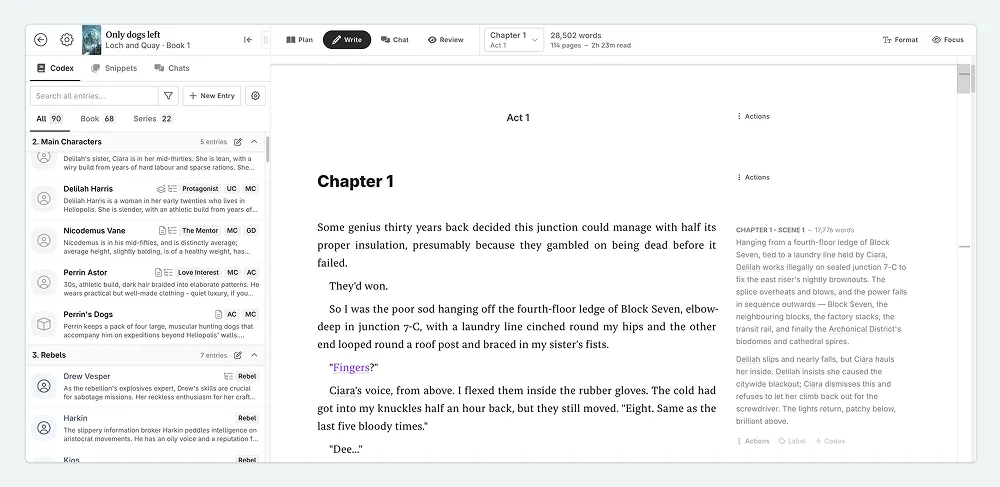
Having it all in one place isn’t the only reason I love the Codex so much. Over time, I found more and more ways to integrate it with my workflow, and I’m going to share some of them with you.
Learn More About the Codex FeaturesHow I Use the Codex
I’ll preface this by saying that this is not the only way to use the Codex, just how I tend to.
Codex Categories
When I start a story, using the default grouping of Codex types is often sufficient for me. I’m jotting down ideas. However, as I move from brainstorming to plotting to writing, and my story bible in turn grows, I find that I need finer control. There are some Codex entries that I always want at hand (my protagonist, for instance), and others that aren’t essential to my daily writing habits.
For this I use Codex Categories. I will often make a category for my non-story specific entries like words I use too often, story structures I use for reference, or ‘weak’ verbs. Then I might group my main characters together (especially if I have multiple POV characters)
I also use the Codex to group items for my work with Novelcrafter. When writing Monthly Muse subject lines, I like to compare them against those used for past museletters. By having a Category for past issues, I can quickly find them.
Codex Details
Codex Details are essential for these non-fiction Codex entries. I create dedicated fields for everything from preheaders and subject lines to open and click rates.
I use the same approach for my fiction writing. In one story, I had a large group of nobility. When I first create a character, the description is enough. But as the story developed, I needed to see the important details at a glance, so I made Details for titles, house memberships, political alliances, and standings in court.
Using Details allowed me to quickly find information rather than scrolling through a text box for it all.
Filters
If I then start writing a scene with all these nobles gathered together, I need a way to find them all. These entries might be split across different Categories, grouped by POV, or into their individual families. But if they all share the tag “nobility”, I can filter by that tag, to instantly see them all!
Search
And sometimes I’m just too lazy to scroll down and find the entry. For moments like these, the Search bar, at the top of the Codex is perfect. Simply type in a word, and any Codex entry that mentions the word comes up. This is perfect for when finding members of the same family, or when you want to see how many characters have blue eyes. You are not limited to entry names.
Between categories, details, filters, and search, I rarely find myself lost in my own story anymore. The Codex changed how I plan my stories. I spend less time searching and more time writing. If you’re just starting out, keep it simple. A character entry, a location or two. Let it grow with your story.

Kate
Based in the UK, Kate has been writing since she was young, driven by a burning need to get the vivid tales in her head down on paper… or the computer screen.