It’s been a while since we updated the model collections that come by default with Novelcrafter. If you wanted to use any of the newer models (like Claude 4), you had to clone and customize them.
The new model collections have been reorganized a bit (we now group by Popular, Other and NSFW) and any deprecated/retired models have been removed.
Because there’s been a lot of issues around the Free models on OpenRouter (they frequently get swapped out, or have bad quality), and the ones left are likely to use your data for training, we also decided to remove them from the default lists. If you want to use free models, you can add them back as a custom model collection.
If you want to go back to the previous collections, we kept them over here.
🧪 New Experiment: Exclusions and Case-Sensitive Matching for Codex entries
This release also adds an experimental version of a “case-sensitive” mode for matching your codex entries (like when your character is named “Hope” you can enable this option to not match for “against all hope”).
Also, Codex entries can now have a list of phrases you want to exclude during matching. So when your character is called “Don”, you can now tell the system to ignore “don’t” as a phrase - same with the name “May” in “how may I help you”.
Learn more about this experiment (and how to sign up for it) on our Discord.
🔧 Other Changes
Made the more optimized Codex tracking system the new default (and removed/replaced the experiment).
Fixed tracking for Codex entry names and aliases with mixed regular and curly double quotes.
Fixed invitees being unable to upload Codex entry thumbnails inside a shared novel or series.
Fixed an issue with going back to the Novel Library when having certain Ad-Blockers on.
Fixed some Table rendering issues in Chat when using DeepSeek V3.
Fixed 400 errors when using Featherless as AI provider.
Added a “wide” mode to scene card width for the plan and matrix views.
Added a button to clone custom Codex categories for when you quickly want to create a category for each dropdown detail value.
The Codex tag selection dropdown will now stay open while selecting.
Fixed “hidden from AI” entries being pulled in chat when using options like “All entries”, “all entries by a type”, “all entries for a category”, etc…
Fixed underlined and strikethrough text not being formatted correctly in .docx exports.
Fixed colorized/highlighted scene contents not being formatted correctly in .docx exports (scene summaries are still missing highlighting during export).
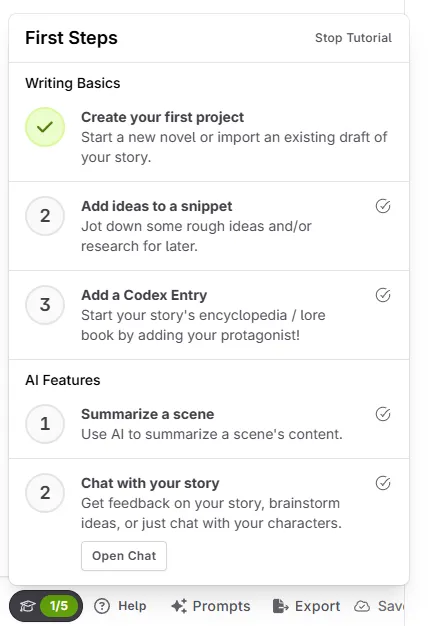
This update might not be as important for existing users, but it contains a new onboarding flow!
Here’s what’s new:
When creating a new account, you’ll see a streamlined landing page to make it easier to start a novel right away.
We added a little tutorial system that has steps for the most common things people do (creating a story, adding a Codex entry, writing a snippet, … that kind of stuff).
Added a couple more hints to set up AI to places where it would’ve shown an error before.
Updated AI vendor list order, and marked ‘Anyscale’ as a deprecated connection.
Other fixes and improvements.
Experiment: Full-View Snippets
Made this feature enabled by default for all accounts.
Fixed some formatting issues with the design being tied to the manuscript settings.
Fixed highlighted text being indicated in the wrong position in the timeline/scroll bar.
We just released an updated with a few quality of life-improvements! Here’s what’s new:
Updated the action menus for acts, chapters, scenes, … to use a new “switch” for settings that are an on/off toggle. The previous changing of a label, or a checkbox was not clear enough.
Fixed copying text from inside a section missing the first letter.
Fixed archived Codex entries inside of relations showing up as “deleted”.
Added an error message when the checkout couldn’t load properly.
Due to all the time-off/holidays, conferences and such, it’s been a while since we have done an app update. Today, we’ve finally deployed a couple improvements and fixes:
Fixed being unable to remove ‘heading’ formatting from text
Fixed not being able to select a model when only a single model is available
Other various bug fixes and improvements
Stay tuned for more updates throughout June :)
After the big May update we also made a lot of tweaks based on your initial feedback and bug reports. For transparency, here’s what we fixed right after the release and throughout May:
Notable changes
Added a “create snippet from section” button to sections
Made panels pin-able on smaller screens (1920x1080px min. size)
Fixed sluggish typing for larger novels with big Codexes
Fixed scene beats pulling in Codex entries from prior beats
Fixed sections excluded from word counting still being counted
Fixed sending additional AI context twice in certain cases
Other changes
Added a link to the prompt update FAQ
Fixed long scene summaries in Write mode overlapping
Fixed context options in Chat not showing up in Safari
Fixed chat not scrolling to the end on Firefox
Fixed being unable to use custom codex Tags in additional AI context
Fixed being unable to clone system model collections
Fixed the current draft Chat user message missing in prompt preview
Fixed not including existing preset inputs when creating a new one
Fixed summarization not working via presets using specific models
You have probably been wondering what we’ve been cooking up lately. Well, today we’re proud to announce one of the largest updates to Novelcrafter yet:
A total overhaul of the prompting system - and a bunch of extra goodies!
Here’s a TLDR version:
All sorts of chapters/snippets/outlines/whatever can now be added as context when talking to the AI
Create custom prompt presets (think GPTs!) without having to clone things first and custom personas (think shared memory)
You can create custom model collections if you get tired of the current list
Define default prompts for each of the areas (beats, chat, …)
Use personas to have cross-project memory for the AI (like your pen name, likes/dislikes and more)
Much improved performance of the app, no more “assembling manuscript”
For a deep dive into every new feature and the full details, check out our complete blog post.
We have made several changes since the last major update. Here is a list of most of them:
Codex
The codex matching will no longer consider a period between letters to be optional (e.g. “S.T.A.R” doesn’t also match for “stars”). This does not affect the optional periods after titles and such (like “Dr Smith” also matching for “Dr. Smith”).
AI
Added Claude 3.7 Sonnet to all system prompts
Updated the model list for the “Detect characters” feature on scenes
The model list for Google AI Studio connections no longer needs to be added by hand. We’re now grabbing the list from Google directly!
Added some model fallbacks for people integrating with Google AI Studio. Some of the system prompts should now work without modifications
Fixed incorrect cases of the “no codex entries found” warning in scene beats
Other changes
Fixed some modals not being able to be closed by clicking on the background overlay or hitting ESC key (for some, like error alerts, we don’t allow this on purpose)
Fixed some HTML markup showing up in the text extraction results. Those should now show up just fine
Fixed some layout issues with the codex preview card
Fixed some layout issues for scene cards that had a lot of labels/references on them
Fixed some visual scrollbar issues in lists when on iOS/Safari
Various other bug fixes and improvements
We also published another Monthly Muse issue, this time all about the “Cozy” genre! Check it out here: https://monthly-muse.com/8