Novelcrafter

Changelog

What's new in Novelcrafter

Follow the latest features, improvements, and fixes as Novelcrafter evolves.

  1. January 8, 2025

    Fixed Write Codex
    • Fixed being unable to copy/paste model settings via clipboard
    • Fixed the editor formatting bar flickering when dragging the mouse cursor
    • Fixed custom codex details shown in the sidebar not being in the right order
    • Other bug fixes and improvements
  2. January 6, 2025

    Improved Fixed Write Codex Prompts

    Happy New Year everyone! Here’s our first release of 2025, packed with fixes for all those bugs you helped spot over the holidays:

    Custom Codex Details

    • Added “show history” option for text line details as well
    • Fixed some details on brand new codex entries disappearing until page reload
    • Fixed some scene beat warnings being incorrect when custom codex details were used
    • Fixed visual duplication glitches around custom details

    AI and Prompting

    • Added an alert when trying to use a prompt that has no models assigned to it
    • Fixed clearing of “last used prompt” when opening the prompt preview
    • Fixed some issues when copying prompts to clipboard that resulted in corrupted instructions
    • Fixed some issues around adding custom prompts when not having a novel open

    Other Changes

    • Added support for importing highlighted and strikethrough text
    • Fixed word count in sections not updating properly
    • Selecting all text in a scene will now include any scene beat/progression boxes at the start and end as well.
    • Other various bug fixes and improvements
  3. December 29, 2024

    New Improved Fixed Write Codex AI

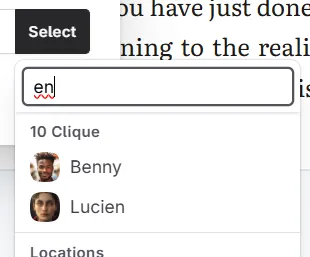
    New: Search in Codex entry selectors 🔍

    Those with (really) large codices can rejoice: even though the menu already had search (by just entering the start of the name), it wasn’t obvious (all menus actually have this feature, actually!)

    As such, there’s now an easy-to-reach search box up at the top: image

    AI and Prompting

    • Progressions are now included in the current scene when summarizing (and the summarization prompt includes the codex)
    • Allow summarizing scenes without content (in case they have an existing summary already)
    • Upgraded the Ollama AI integration to use newer APIs
    • Fixed syntax errors in chat prompts not allowing to go open the original prompt

    Other changes

    • The Codex search (in the sidebar) now also looks into text area and text line custom details.
    • The marker timeline in Write mode will now merge consecutive highlights (e.g. if you highlight a couple paragraphs in a row)
    • Fixed certain long novel titles overflowing in your novel shelf
    • When copying text from text areas (e.g. codex, snippets, …) into the clipboard, they’ll now be in Markdown
    • Various other bug fixes and improvements
  4. December 22, 2024

    New Fixed Codex

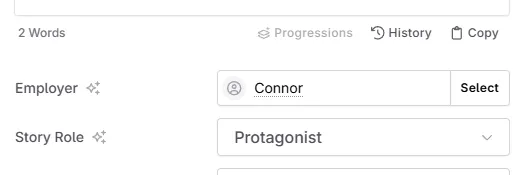
    New: Codex references as custom details!

    This one needed a bit more testing, but you can now also have a custom codex reference as a codex detail!

    image

    Some examples include:

    1. Picking a race/species entry (no need for custom dropdown options!)
    2. Selecting the vampire sire of a fledgling
    3. Associating an entry with a faction/country/home town

    Other changes

    • Added a handy “sort labels” button to novel labels and dropdown details
    • Fixed a couple overflow/layout issues with the new codex entry design
    • Fixed the tags input not closing the first time you go out of it
    • Fixed some inconsistencies with the codex settings and details in read-only novels
    • Other various bug fixes and improvements

    2nd update (hotfix):

    • Fixed an issue with the prompt editor where keyboard interaction got blocked
    • Fixed copying prompts with many components
  5. December 21, 2024 🎁

    New Improved Codex AI

    We’ve been hard at work these past months, and finally have a little holiday present that you all have been waiting for:

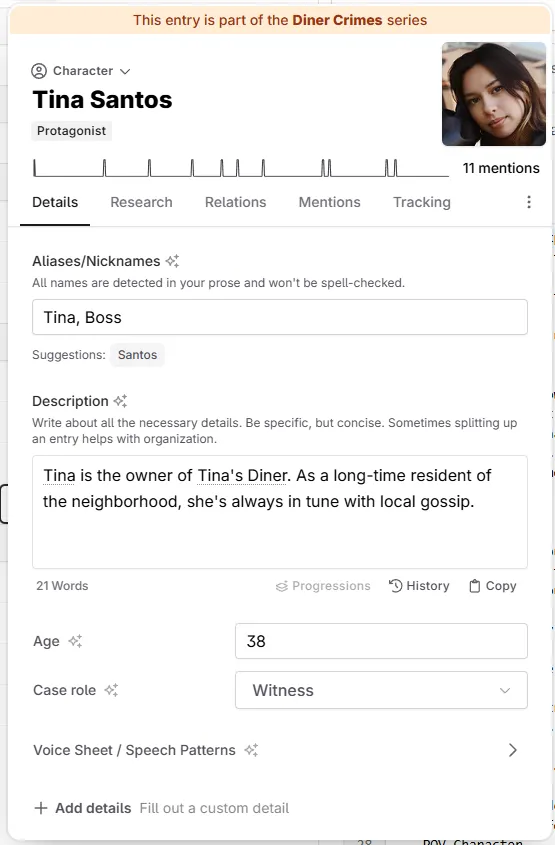
    New: Custom Codex Details!

    Forget about splitting a codex into many pieces, or cramming too much detail into the description box. With custom details, you can now have more control over the individual pieces that make up your story!

    image

    For example:

    • Specify a story role (protagonist, antagonist…)
    • Which faction someone belongs to
    • Autopsy reports (that only NSFW models get as detail)
    • Contents that should be invisible to the AI (e.g. personal notes)

    Special thanks to our dedicated community of testers who spent months helping us debug and refine codex details!

    Furthermore:

    • You can also have your custom categories only collect entries for when a specific detail has been set
    • You can have details only show up in NSFW prompts, or exclude them from the AI completely (useful for private notes)
    • Additions have evolved to Progressions! You can now target a specific detail (not just the description), and even say if it should replace the full text. This is helpful, if you want to change the interior design of a place after renovation.

    There are a couple things we haven’t managed to finish in time, but will be added soon:

    • Support for custom details in Chat Extraction
    • Support for importing your codex (including any details)
    • Support for codex details in novel templates

    Other changes:

    • We moved tags on the codex entry to the top, below the entry name, since that’s a more natural place.
    • We also reorganized the tabs a bit: Notes and external links are now under “Research”, the “Appearances” tab has been renamed to “Mentions” and we got a new “Tracking” Tab to consolidate all the options. The “Relationships” tab has been shortened to “Relations”
    • You can now decide to never have a codex entry included in the AI context (no need to archive them anymore), even if you use custom prompts
    • Labels no longer require a color
  6. December 18, 2024

    New Improved Fixed Prompts AI

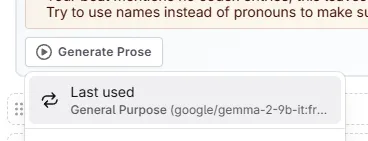
    New: Last used prompts now get remembered 🧠

    image

    When picking a scene beat, chat or summarization prompt, Novelcrafter will now remember the selection for the current session. This should speed your workflow up quite a bit!

    New: Prompt components! 🧩

    You can now split out instructions that you want to reuse all over the place. No more copy-pasting of things you want to have in all of your copy-editing/critique/… prompts!

    Then, to include a component in your prompt, just call them by name!

    Instructions
    {include("My global style guide")}
    

    To make things easier, there’s a handy-dandy “Copy” button for this specific instruction below each component.

    With components, it makes it easier for us to add additional features to prompts, since previously you’d have to manually update your own variations when the system prompts changed.

    As such, all the system prompts have been updated with new calls to components.

    New: Improved copy-pasting of prompts 📋

    Since prompts can now be more modular, we had to update how sharing works. When you copy a prompt, you will now get different options to choose from. Similarly, when pasting a prompt, you can now see a fancy preview, before adding the prompts immediately to your library!

    Some more prompting updates

    • When pasting prompts, the “(Copy)” suffix will no longer be added
    • You can now add a formatted description to a prompt, either for notes to yourself - or as a guide for when you share it with others.
    • When your prompt instructions have a syntax error, the message will now show you a location (line and column) where it happened, and also offer to open the prompt right away.

    Other Changes

    • Added the ability to cancel a scene summarization (in case you mis-clicked or something)
    • Added links to the last 3 changelog entries to the help menu (in case you missed one!)
    • Some AIs like to use a “bullet point” character in chat, so we’re now converting those into a proper list on the fly
    • Fixed some empty error message issues surrounding the Google AI Studio integration
    • Other fixes and improvements
  7. December 14, 2024

    New Improved Fixed Chat Plan Write Prompts AI

    Write

    • Colorized sections are now being highlighted in the marker timeline as well (righthand side in the Write view)
    • Added support for HRs, headings and blockquotes in beats

    Chat

    • The chat now supports certain types of code blocks in chat messages
    • Fixed extract sometimes matching the wrong codex entry (like “Geneva” for “Eva” - whoops!)

    Prompting

    • We made parentheses in #if blocks optional (so you can write {#if context.isStartOfScene} as well)
    • Fixed the first/last N number of words not being cut off properly for non-latin languages (esp. Japanese, Chinese, …)

    Other changes

    • Added experimental “Google AI Studio” support as an AI vendor - this one requires you to provide your own model list.
    • Added a support diagnostics modal to help us with common issues
    • Fixed codex matching not updating when changing novel language
    • Fixed scene subtitles overflowing in plot matrix
    • Fixed brown colors for dark mode looking more like orange
    • Other various fixes and changes
  8. December 5, 2024

    New Improved Fixed Prompts AI Export

    New Help & Profile Menu updates

    To make things simpler, we’ve redesigned the Profile menu, and moved out the help section into its own little button:

    1. The profile menu now has quick links to the settings - no more clicking around
    2. The help menu also shows a live service status - in case you want to see if e.g. Anthropic is down. image

    New AliPay option

    For people in China, our payment provider recently added the ability to pay via AliPay! You’ll need update your existing payment method in the billing portal, if you want to switch over.

    AI & Prompting

    • Added native integration with Arli AI (another fixed-subscription-price AI vendor)
    • Fixed empty spaces in API keys not being removed and causing confusion when no models show up
    • Fixed archived codex entries being accidentally included in the AI context

    Other changes

    • Added a retry button to all sync error messages. This should help with saving when unknown errors occur
    • When importing a novel, any save errors will now be shown to the user
    • Fixed exported files using UTC time in the file name, and not the computer’s local time
    • Fixed clearing out scene contents when it just had an empty beat/section/etc.
    • Fixed codex entries with just punctuation in their name crashing the app
    • Various other bug fixes and improvements
  9. November 5, 2024

    Improved Fixed New Prompts AI

    Bit of a small one today, but we wanted to fix the latency issues introduced last week!

    Custom prompting

    • When sending codex data to the AI, the entries are now sorted alphabetically (for those that split up their codex entries: this should help quite a bit!)
    • Added new “names” format to codex functions, which skips all descriptions (useful for dictation prompts), for example : codex.all("names") or codex.getAllByType("character", "names")
    • Added new “system as user” toggle for models that don’t support system messages (for o1 and some infermatic models)
    • Added an option to disable streaming for models that don’t support those kinds of responses (o1 for example)

    Other changes

    • Fixed floating panels (codex, snippet, chat) appearing in front of (alert) modals
    • Fixed highlighting markers in timeline not showing their actual height
    • Fixed collapsed sections still showing highlighting markers in timeline
    • Some other bugfixes and improvements
  10. October 31, 2024 - 🎃 Pumpkin Edition

    New Improved Fixed Write Review

    For this Halloween, the spirits have haunted us and made us do something we’ve never done before!

    We’ve reset trials - and extended them, too!

    You heard right: Everyone still in a trial, or who had a taste before November 1st, got a reset - and we permanently extended them by a week. Which means everyone has until November 21st to try out Novelcrafter (again).

    Some are hobbyists who only write on weekends, others have family obligations; we know everybody’s time is precious. With November being arguably the most popular month for writing, we decided to give everyone the time they need to explore Novelcrafter.

    Big thanks to all the people who have given their feedback and filled out the trial survey so far (and continue to do so)!

    November’s Monthly Muse: Tarot Tales

    If you want to be visited by the spirits as well, why not try out this month’s game of Tarot cards to inspire your next story?

    Shuffle the deck and draw cards for the Hero(ine)'s Journey, your character arc, or for world building inspiration. The writing prompt is hidden in the details. Will you find a tale of love and loss or perhaps a twist of fate?

    Check out Tarot Tales here

    Other changes

    • Added word count per chapter in review mode
    • Allow sections to be excluded from word counting
    • Added undo/redo buttons to editor bubble menu
    • Added rotate/zoom/flip controls to image uploader
    • Fixed an issue with nested modals on mobile
    • Fixed codex/snippet/chat search being cleared when moving between plan/write/… modes
    • Various other bug fixes and improvements