Today’s update refreshes the system prompt model lists with the following additions and changes:
Removed models that are no longer supported by their vendors (e.g. older Gemini and Mistral).
Included more modern and alternative models that perform well at their tasks (e.g. GLM, MiMo and Aion)
Existing Chats using removed models from the old system collection will keep their settings.
As always, you can find previous system model collections in the archive.
AI/Prompting
Replaced the “Try for a spin” with a search modal for easier access than a menu. This also fixes the issue of the site hanging when listing models from Featherless.
You can now pick any one-off model for a Chat thread, without the need for a model collection.
Fixed the pov prompt functions not working with equality and contains checks - especially when comparing POVs with characters. This should improve the output of the default scene beat prompt when dealing with multi-POV stories.
Disabled auto-cache-write requests for GPT 5.6/6/6.1 models when used via OpenRouter. Previously, cache writes were offered for free, but now they’d cost 25% extra.
Updated the AI vendor icons for OpenRouter, Google AI Studio and Featherless, since they’ve all changed their branding.
Other Changes
We gave the settings modal a little visual polish. Same stuff as before, just easier to find.
Added an option to show plain loading screen messages instead of the playful ones.
It’s been quite some time since our last big update. Even though most of our changes with this one are kind of behind-the-scenes, we do have one major thing that’s new:
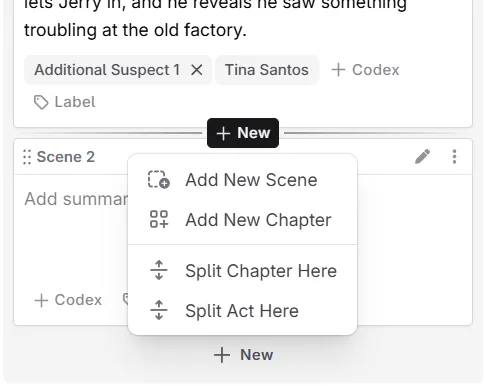
Today’s update overhauls how you create, move, and organize your acts, chapters and scenes!
Don’t worry - it largely looks and feels the same. However: you now have way more options to organize your book from either, the Plan or the Write view. Who doesn’t like less back-and-forth hopping?
Organization updates
You can now insert acts, chapters, and scenes before or after an item from the ‘New’ menu
There’s a new menu in-between scenes to insert scenes and chapters in Plan and Write
That menu also lets you split chapters and acts in-between scenes now
You can now move acts, chapters, and scenes up, down, or to the beginning/end from the action menus (in both Plan and Write)
The Outline plan view has been revamped, and now allows collapsing your chapters
Scene creation and last-updated times are now shown in their ‘History’ sub-menu
Other changes and bug fixes
Tons of bug fixes around drag-and-drop positions when moving items into the wrong place
Extracting Codex entries from chat now keeps nested lists in their descriptions
Revision history no longer hides a newly reverted change after re-opening its the history
Write scene sidebar is kept at full opacity while action menus are open
The “Collapse/Expand” all options for the Codex sidebar are now accessible directly through the cog menu
Similarly to scenes, you can now see the last updated and first created dates for your Codex entries and snippets in their respective action menus
The novel library no longer groups your books by default (this is only for new users)
We’ve also done quite a bit of performance improvements, so things should feel much snappier
AI/prompting changes
Unsupported image and batch models are now hidden from the OpenRouter list
Unsupported models via Google AI Studio are also now hidden
We removed OpenPipe from the available AI connections (they have shut down)
We also removed the ‘Fine Tuning’ badge from the OpenAI connection (they no longer offer it for new users)
Today, we’re enabling two long-awaited experimental Codex features for everyone: better control over tracking your entries, as well as allowing an entry to be in more than one custom category at a time!
For those that wanted to have a “Don”, “May” or “Will” as part of their stories, have probably quickly realized that Novelcrafter picked up on a lot more mentions than it should have. For these kinds of entries, we added two new options:
Marking an entry as “case-sensitive”: For most occurrences, this should already be a one click solution for most false positive matches.
Excluded phrases: Some phrases may still pick up a name at the start of sentences (e.g. “May I”, or “Will you”) and can now be added to the exclusions.
So, if you’ve got a “Don”; simply enable case-sensitivity, add “don’t” to the excluded phrases, and you’re good to go!
As always, massive thanks to our testers for finding various edge cases and weird names to test against!
Entries In Multiple Categories
Sometimes, a character or location just doesn’t fit in a singular category. They may be part of a faction as well as belong to a group of friends. Fear not! Novelcrafter will now simply put them in all the categories that match.
There’s no options here, this has now been enabled by default.
Other Changes
Improved performance when selecting text in the editor for people with many text replacement prompts.
Clicking on an already open Codex mention in text now closes the preview card if the mention gets clicked again.
Fixed opening the Codex preview card when selecting text within a mention.
Fixed the use of ‘export act/chapter/scene’ being merged with an earlier export selection.
Fixed being unable to scroll in some Modals in Chrome-based browsers.
Fixed getting sync errors when opening/closing sections in a read-only novel.
Fixed an issue where adding more than 40 custom Codex Details to an entry at once would throw an error and lock up the Novelcrafter interface.
The series page now shows the invitation count on the Collaborator tab.
We’re now filtering out the unsupported “Sora” and “Image” models via the OpenAI connection.
We’re now filtering out the unsupported “Voxtral” and “Pixtral” models via the Mistral AI connection.
We just shipped an update that adds support for bullets and numbered lists in the Word / .docx exports! Feel free to try it out with your document and report any bugs or if we missed something.
Here’s more that we shipped recently:
Help & Support
Revamped the Help popup with a fresh design and clearer status indicators.
Added banners to alert you about unread support chats or if you are using an outdated version of the app.
Introduced a new system status indicator so you can quickly see if any services are having trouble.
Prompting
Added a new “has description” filter to the prompt library.
Today, we’re releasing our experimental support for thinking/reasoning to everyone. As all experimental features, you can enable it in your Settings.
Since models differ a lot in how they do their reasoning, we chose a more general approach: Once opted in, you’ll see an option to ‘prefer’ or ‘avoid’ reasoning across your Scene Beats, Chats, and other areas in Novelcrafter.
To tweak the reasoning level, you can do so via the custom model parameters (just like changing temperature).
We just updated the system model collection to include the new Gemini 3 Pro model. The update also includes an update of GPT-5 to GPT-5.1 (where applicable).
Today we updated the default AI model collections. The new collections now include Claude 4.5 Sonnet, contain updates to newer versions (e.g. the new Gemini 2.5 Flash) and have been cleaned up to remove models with very low usage.
We haven’t posted an update in a while, so here’s what’s new today (plus some fixes we’ve made over the past few weeks):
🤖 AI Connections
We’ve updated and enhanced the inner workings of all AI connections:
Added a new generic “OpenAI Compatible” provider to support other niche platforms. If we don’t have official support for a vendor, you should now be able to use them through this connection!
Google AI Studio: Updated the icon to their new official logo—in case it looks different, that’s why!
Mistral: Fixed thinking steps in some models flooding your screen with [object Object].
Mistral: Added support for the “Detect Characters” feature.
Updated the model list filtering in various providers to only show supported model types.
Removed the legacy “Anyscale Endpoints” connection.
🧑🏻💻 Prompting
While we continue to enhance our prompting system (and its documentation), we’ve cleaned up a few things and added/fixed some functions:
New min and max functions to get the minimum and maximum value of a list of numbers. For example: when using it in a custom shorten prompt, you can now ensure a min. word count.
Fix multiply not working as expecting - it now returns the full product of all provided numbers.
🔧 Other Changes
Fixed timeout-related loading issues with novels that exceed 100MB in total size.
Fixed some more rare AI streaming issues in Chat, which turned some messages blank.
Fixed placeholder labels in text editors not updating in some cases.