Novelcrafter

Changelog

What's new in Novelcrafter

Follow the latest features, improvements, and fixes as Novelcrafter evolves.

  1. October 22, 2024

    Improved Fixed Write AI Export Snippets

    Updated Word Counting… again

    We’ve updated the word counting system when you’re using an up-to-date browser. This means that we now support a much wider array of languages, since the actual counting is provided by your system itself. If you’re on an older browser (e.g. Firefox Version older than 125), please update accordingly to make use of the new version.

    While we tested this with our existing changes we did on September 5, please report any errors you might find with your language!

    Improved image upload quality

    On certain images (e.g. ones with glitter, line art, or harsh angles) the image uploads (especially covers) were not as pretty as they can be - we updated the internals to get rid of any (pixelated) artifacts, but any previously uploaded images have to be re-uploaded if you want to take advantage of the new quality.

    Other changes

    • Added native integration for OpenPipe for those that want to use their fine-tuning services
    • Fixed the Mistral integration not being able to load the model list
    • Fixed being unable to export snippets that had text copied from AI generations
    • Other various fixes and improvements
  2. October 17, 2024

    Improved Fixed Write Export Snippets

    Today’s update is a patch release for things that cropped up with all the editor updates:

    • Added support for lists in scene beats and codex additions.
    • Fixed codex addition formatting not showing up properly in Codex Details or the Matrix view. All your bold, highlighted or numbered contents now show up as well.
    • Fixed colored/highlighted text in manuscript not matching up with the marker timeline to the right
    • Fixed issues with Grammarly not working properly after the editor updates
    • Fixed some actions being ignored on some touch devices
    • Fixed a couple overflow issues where style menus could be cut off

    Other changes

    • Added support for exporting individual snippets
    • Various other fixes and improvements
  3. October 16, 2024

    New Improved Fixed Chat Plan Write Codex AI Export Snippets

    More rich text formatting options

    Have you ever got a nice response in Chat, then saved it as a snippet and discovered all the pretty formatting has been lost? Yeah, we, too - too many times.

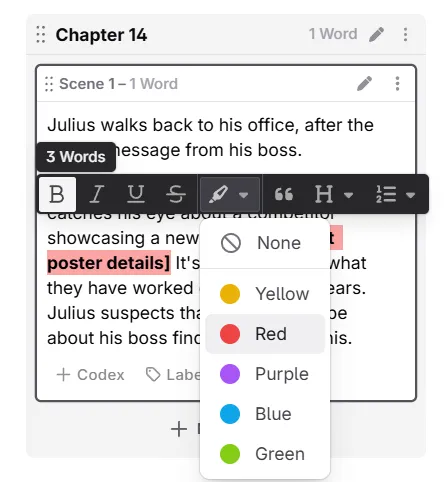
    With today’s update we added proper support for lists (numbered and bullets), headings (H1 to H3) and other formatting options to (almost) all text editors:

    • codex descriptions and notes
    • manuscript/write view
    • your chat questions/messages
    • snippets

    image

    Take note that the Word export does not support all the features yet (we’re still working on those)

    AI / Prompting

    For people who want to spend a monthly price, instead of credits, we now added native support for Featherless AI and Infermatic. They mainly host NSFW-friendly models, so these are a good alternative if you’re writing romance stories.

    • Added native connection to Featherless AI
    • Added native connection to Infermatic
    • Added hostname/IP/HTTPs options to LM Studio integration. This should help when you’re connecting via the network
    • We’re now filtering out any voice or image models from Open AI, as we don’t support those within Novelcrafter
    • Fixed context calculations for Gemini models (OpenRouter changed their calculations, so using these models should be cheaper now)
    • Changed the Cohere Command-R+ models on system prompts to use the older April version. Internal testing has shown that it’s a bit more creative than the August version.
    • Added a “copy” button next to prompt messages for easy access

    Chat

    image

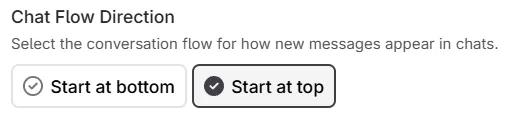
    We also added a setting to change chat message flow for threads: You can either have messages start at the top, or bottom, which should help with when you want to read the answer as soon as it comes in, without having to wait until it stops scrolling.

    Furthermore, the extraction feature now supports tags/labels as well, if you add them via square brackets to the name, like the following format: First name "Alias" Last name [Tag A, Tag B].

    Other changes

    • Added an option to also clone snippets when using a novel as a template
    • The appearances tab in the codex will now show better titles for chat (unnamed threads will use the first message as fallback, just how the sidebar does it)
    • You can now upload a novel cover from your clipboard as well
    • Various other bug fixes and improvements
  4. October 2, 2024

    Improved Fixed Codex Prompts AI

    This release updates the system prompt model lists with the following additions and changes:

    1. Added more free models like Gemma 2, Llama 3.1 and the like
    2. Added L3.1 Euryale 70b as a more affordable NSFW option
    3. Moved Claude 2.0 from Popular to just the “Anthropic” group

    Other changes

    • The codex matching now takes apostrophes in plural suffixes into account (e.g. “Peter’s” is now matched in full instead of just “Peter”)
    • Chat threads in the codex appearance tab are now sorted in reverse chronological order
    • Archived codex entries that are used in POV settings are no longer being shown or added to prompts
    • Fixed errors around empty OpenRouter custom routing options
  5. September 23rd 2024

    Improved

    This update includes a couple fixes for when data can’t be saved and reduce data loss on unreliable connections as well as improving detection around logged out users.

    1. Sometimes the internet can be intermittent, so we added a way to retry a request when those “failed to fetch” errors happen. This way changes are not lost when they could not be saved on first try.

    2. In addition, we added custom error handling for the “Unauthorized” errors; we now give you a warning and an option to reload the page.

    3. We also improved the error message for when you are not allowed to change or update something. The system now gives a better help text on why that is.

  6. September 19, 2024

    Improved Fixed Chat Write Codex Prompts Export Teams

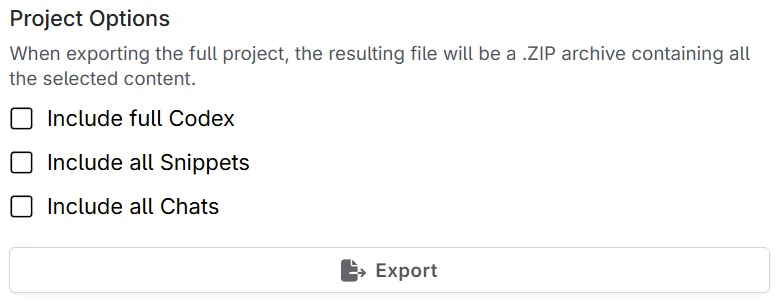
    Full Project and chat exports are here

    image

    You can now export your chats just like you can export your codex or snippets! In addition, the novel export screen now has a section to include other aspects of your novel to get a single “full project” export of your novel.

    Codex

    • Added a new global setting for the codex to always create new entries in the series scope (helpful when most of your entries are part of a bigger universe)
    • Fixed support for codex entries with accents or other special characters in the codex search bar (e.g. Élise can now be found via Elise as well).
    • Fixed being unable to upload a thumbnail to a series codex entry that you were invited as an editor to.

    Write

    • Added the ability to show/hide scene beats in read-only novels as well as revision histories.
    • Fixed adding an empty paragraph in scenes that only have a blockquote

    Chat

    image

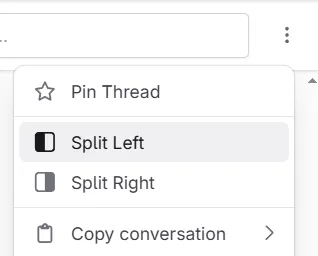
    • Added a new “split left/right” option to chats so you can turn them into a side panel when you want to work in another view
    • Added new “Empty threads” filters to chats. Sometimes you just start a new thread and don’t end up using it. This makes those easier to find.
    • Fixed the chat message taking your input focus away when the AI has finished writing. This was annoying when you were editing a codex entry as you were waiting.
    • Fixed “Extract” being available in a read-only novel (was kind of useless since you can’t save anything)

    Prompts

    • Update model filtering to support new OpenAI o1 models
    • Updated prompt parsing to keep indentation when calling functions. This means XML indentation should be kept when desired.

    Other changes

    • You can now subscribe to Novelcrafter anytime throughout your trial (and not just near the end of it)
    • Added number of members + shared contents in team settings tabs
    • Fixed team lists with more than 25 members not loading all user details at once
    • Various other bug fixes and improvements
  7. September 5, 2024

    Improved Fixed Plan Write Review Prompts

    Word counting changes

    This update makes word counting to be more in line with Scrivener. Both, Word and Google Docs (which we have used as a guideline so far) have issues counting words with em-dashes, punctuation and other special characters. The updated word counting is now more like what people would count as real words.

    For comparison:

    • I wish you would - oh, never mind. now counts as 7 words, not 8.
    • It was … complicated. now counts as 3 words, not 4.

    Performance improvements

    We internally upgraded to a new version of the framework Novelcrafter is using to render stuff on screen. While there were great performance improvements, the memory consumption should be even less for bigger novels now. Though we did extensive testing, as always, please report if some things aren’t updating quite right.

    Update to Mistral models in system prompts

    For all system prompts, we now configured all Mistral models to go through the “Mistral” provider on OpenRouter. While OpenRouter does allow calls to “Azure” as well, those have a special moderation layer that can cut off the output too early if it detects an issue, causing you to loose money as the AI already started responding. Novelcrafter cannot show you when these “in-stream moderation” errors happen yet, so we opted for this solution for the time being.

    Other Changes

    • Added the ability to copy all scene beats into the clipboard (for scenes, chapters and acts)
    • Added a “Hide my email” setting for YouTubers/presenters/teachers that don’t want to have their personal mail on display.
    • Fixed some codex detection issues on older versions of Safari. We’re now using a fallback that should work OK for the most part. If issues still arise, please update your browser.
    • Fixed not being able to dissolve collapsible sections
    • Fixed chapter titles (and automatic numbering) not always refreshing/updating and being in an inconsistent state
    • Fixed a few paragraph indentation inconsistencies with beats/additions and sections
    • Fixed some visual shifting when showing a horizontal cursor before a beat at the start of a scene
    • Fixed codex thumbnail uploads saving to the wrong entry on slow connections, when immediately switching to another one
    • Fixed context.previousBeat always picking first beat of a scene, instead of the one before
  8. August 31, 2024

    Improved Fixed Write Review Import Collaboration

    This release mostly contains bug fixes and general improvements:

    Manuscript improvements

    • Added some mitigations for the wild cursor jumping. While not totally gone, we hope these changes help in some cases. Please keep the reports coming if it’s still occurring!
    • The scene beat validation will no longer nag about entries with nested references having no description, or that your global entries have short descriptions. Since these are common use cases, it makes no sense to have a constant warning for those.
    • Added a selection outline to scene beats and collapsible sections to indicate if they’re focused (e.g. when you used the drag handle to move them around)
    • Fixed not being able to put a cursor between a scene beat and a following section

    Other changes

    • Added an additional “Add Chapter” button to the end of Acts when in the Outline plan view
    • Added the ability to switch the codex “filter by tag” to “match any”, instead of requiring entries to match all selected tags
    • Fixed some errors with .docx imports where formatted text was incorrectly interpreted for headings and other parts
    • Fixed some issues around handling Asian languages (like Thai)
    • Fixed some visual inconsistencies with sharing novels and series depending on your plan and/or team status
    • Fixed the “characters per scene” chart sometimes not loading correctly
    • Some optimizations around app loading times and general memory usage (e.g. previously, prompt previews were kept in RAM indefinitely until reloading Novelcrafter)
    • Fixed the “you’re no longer logged in” modal appearing on App start when on a slower connection
    • Added a max-width to menus for when names get too long (e.g. series selection)
    • Some additional improvements for chat extraction with heading + blockquote cases
    • Various other bug fixes and improvements
  9. August 23, 2024

    Improved Fixed Codex

    This release changes the routing to Novelcrafter itself, which should increase stability and reduce latency across the globe, especially for people in Oceania or in rural places.

    In addition, the following minor changes have been made:

    • Fixed some issues around codex matching for entries with quotes in their name
  10. August 19th, 2024

    New Improved Fixed Codex AI Teams Collaboration

    Teams for your friends, family, colleagues and more!

    To create a team, you need the Specialist plan, but everyone else can benefit as long as they have any plan!

    image

    Let’s say you’re working on more than one book or series, and you have to add a new person to your writing projects. Before now, it was quite tedious to add them individually, but with the new teams feature you can set one up once and simply share your novels or series with everyone involved!

    You can reach the Teams feature through the settings dialog.

    You can invite members by email, and even have everyone set whether they want to be visible to the others. Team leads can also decide if sharing of novels and/or series with the team should be allowed and even hide the member list entirely (e.g. for more “public” teams with dozens of members).

    With the introduction of teams we also reworked how invitations work and look; only owners and team leads can now see the emails of invited people/members. For privacy reasons we’ve disabled showing them for anybody else.

    Shared with me - At a glance

    image

    For those that have a lot of novels or series shared with them, there was no easy way to figure out who owns what or where you’re all involved with. The new “Shared with me” tab in the settings lists out all the content either shared with you directly, or through a team, and allows an easy way to leave them, too.

    Move codex entries to… somewhere else?

    image

    Sometimes an entry doesn’t fit into your current novel or series, or has been mistakenly added to the wrong project. The new “Move to…” feature allows you to move the codex entry somewhere else altogether!

    Performance optimizations for large codexes

    Some people have started to build up hundreds of codex entries and the performance for matching your entries has tanked quite a bit.

    A new system has been built that should work much better with entries that share a common structure (e.g. “Town name - entrance”, “Town name - central”, or things like “Country - Flora & Fauna”, “Country - Towns”).

    In addition, any archived scenes you have will no longer be looked through either, since it didn’t make much sense in the first place.

    Other changes

    • Codex additions now have a double-newline between them when sent to the AI (previously, they were all concatenated together)
    • Any dialogs left open will no longer be saved as part of the “remember where I left-off” memory. That was a bit confusing.
    • Fixed deleting prompts leaving a local copy behind until page reload
    • Some additional fixes to chat/snippet extraction for weirdly formatted lists
    • You can now open the series page from the codex series header
    • Added a little list of providers for the OpenRouter provider routing settings in custom models
    • Various dialogs (like settings or revision history) on mobile now have a fixed height and some other improvements with regards to usability
    • Various other bug fixes and improvements