The Big Organization Update
New Improved Fixed Plan Write
It’s been quite some time since our last big update. Even though most of our changes with this one are kind of behind-the-scenes, we do have one major thing that’s new:
Today’s update overhauls how you create, move, and organize your acts, chapters and scenes!
Read the full guideDon’t worry - it largely looks and feels the same. However: you now have way more options to organize your book from either, the Plan or the Write view. Who doesn’t like less back-and-forth hopping?
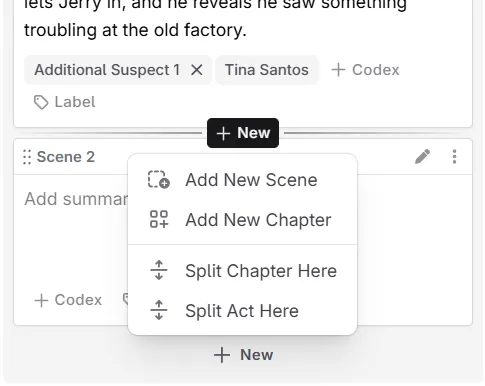
Organization updates
- You can now insert acts, chapters, and scenes before or after an item from the ‘New’ menu
- There’s a new menu in-between scenes to insert scenes and chapters in Plan and Write
- That menu also lets you split chapters and acts in-between scenes now
- You can now move acts, chapters, and scenes up, down, or to the beginning/end from the action menus (in both Plan and Write)
- The Outline plan view has been revamped, and now allows collapsing your chapters
- Scene creation and last-updated times are now shown in their ‘History’ sub-menu
Other changes and bug fixes
- Tons of bug fixes around drag-and-drop positions when moving items into the wrong place
- Extracting Codex entries from chat now keeps nested lists in their descriptions
- Revision history no longer hides a newly reverted change after re-opening its the history
- Write scene sidebar is kept at full opacity while action menus are open
- The “Collapse/Expand” all options for the Codex sidebar are now accessible directly through the cog menu
- Similarly to scenes, you can now see the last updated and first created dates for your Codex entries and snippets in their respective action menus
- The novel library no longer groups your books by default (this is only for new users)
- We’ve also done quite a bit of performance improvements, so things should feel much snappier
AI/prompting changes
- Unsupported image and batch models are now hidden from the OpenRouter list
- Unsupported models via Google AI Studio are also now hidden
- We removed OpenPipe from the available AI connections (they have shut down)
- We also removed the ‘Fine Tuning’ badge from the OpenAI connection (they no longer offer it for new users)