- Level:
- Advanced
- Lessons:
- 13 Lessons
Handling Sensitive Content with NSFW Details
Keep your detailed character notes complete while avoiding moderation issues during everyday writing sessions.
- Reading Time
- approx. 3 min
Do your characters have secrets? Maybe your villain’s fighting style is brutally detailed, your protagonist has a colorful vocabulary, or your romance leads have some very specific preferences.
In Novelcrafter, you can mark any Codex detail as NSFW (not safe for work). This ensures only prompts you’ve explicitly marked as NSFW (and therefore use with unmoderated AI models) will be shown that information. Your character’s extensive knowledge of medieval torture devices stays tucked away until you are writing a relevant scene.
When Should I Use This?
Marking a detail as NSFW is helpful when you have content that:
- Contains spicy, explicit, or adult material that could trigger moderation on certain AI models
- Includes graphic violence, gore, or disturbing imagery
- Covers sensitive topics you only need for specific scenes
- Would be inappropriate or jarring if referenced in lighter moments of your story
Common examples include:
- A character’s preferences in intimate or sex scenes
- Detailed descriptions of injuries, scars with violent origins, or autopsy findings
- Combat techniques or weapon expertise that gets graphic
- Trauma backstories with explicit details
How to set it up
Create your NSFW detail
To make a NSFW Codex detail in Novelcrafter:
In the Codex sidebar, click the cog icon and open the Custom Details settings:
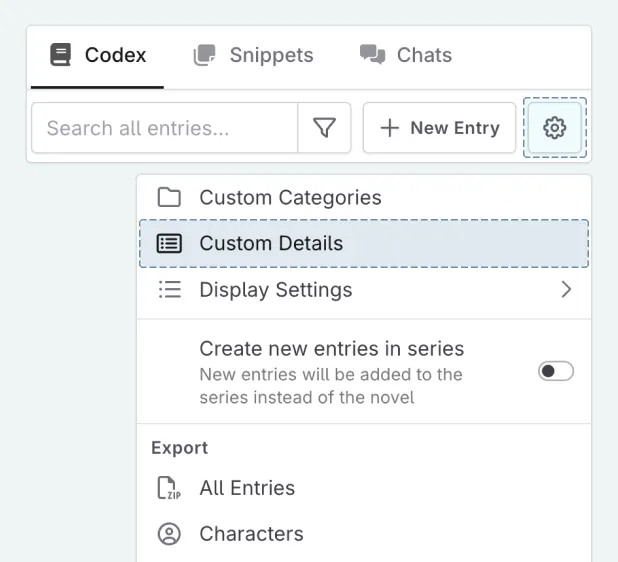
In the settings, click + New Detail and choose your detail type (text works best for detailed information)
Name your detail something clear, like “Intimate Preferences” or “Autopsy Details”
Go to the AI tab in the detail settings, and select only include in NSFW prompts. The detail now has a NSFW tag next to it
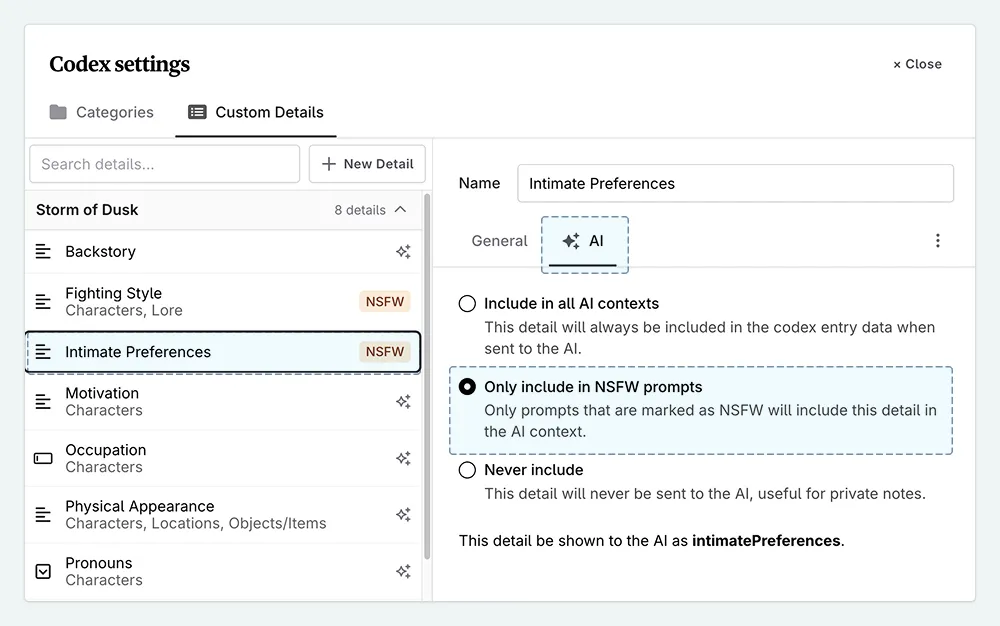
Now, when you add this detail to any Codex entry, the information will only be added to the AI context when also using a prompt marked as NSFW. Trying to use NSFW details with the system prompts will not work.
Marking your prompts as NSFW
Once you’ve added content to an NSFW detail, you tell Novelcrafter when to use it by marking prompts as NSFW.
When a prompt is marked this way, any AI models that moderate content will not be available in the selection menu (for example GPT or Anthropic models). This helps prevent these models from accidentally flagging your content as moderated - and thus refusing to work with the material.
To set a prompt as NSFW, open it in your prompt library, and:
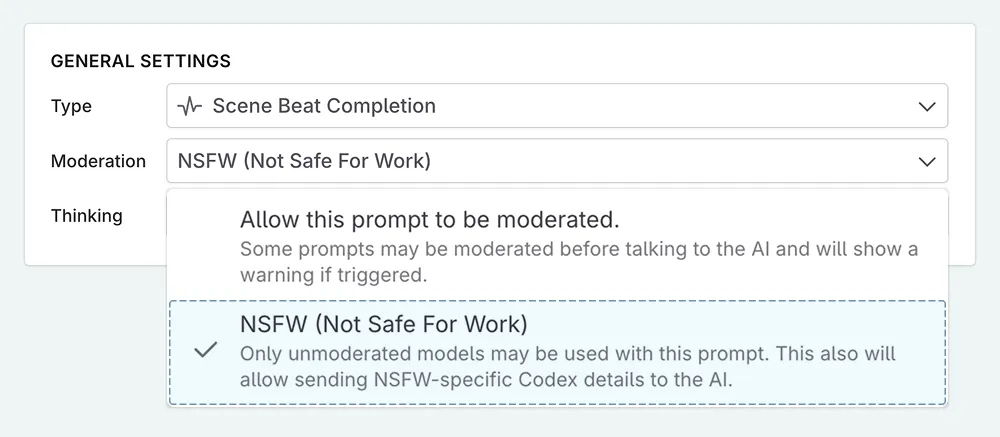
Go to the General tab of the prompt.
Scroll down to the general settings (at the bottom).
In the moderation setting, choose the “NSFW” option.
Case Study: The Reformed Assassin
Let’s see this recipe in action. Our protagonist, Adam, spent fifteen years as a contract killer before changing his life completely. His combat expertise is central to several key scenes, but those skills involve some unpleasant specifics. Most of the time, Adam is trying to avoid his past. We will put the less savoury information in the in-built “Fighting Style" detail type.
Adam Smithson is a 42-year-old former assassin, now working as a security consultant. He’s quiet, observant, and struggles with guilt over his past.
Adam favors close-quarters elimination. He knows where to strike for silence—the specific angle for a blade between vertebrae, how long to maintain pressure on a carotid. His weapon of choice…[and so on]
With this setup, you can write Adam having coffee with his therapist without the AI suddenly referencing vertebrae or blades. But when you reach the scene where old enemies find him? Use a NSFW prompt, and his deadly expertise can flow naturally into the narrative.
Troubleshooting
Why isn’t my NSFW information appearing in AI responses?
This may be because you’ve filled out your NSFW details, but the prompt you have selected is not marked as NSFW. Double-check your prompt settings. Make sure the specific prompt you’re using has the NSFW option enabled, or that you are using the correct prompt.
You can also confirm this by checking the prompt preview.
I’m still getting moderation flags. What’s wrong?
This can happen if the same content also exists in your main description, scene beats, or elsewhere in the context. Review your entire Codex entry. Move all sensitive content exclusively into NSFW-marked details and keep the main description clear of it.
The AI doesn’t seem to know my character. Have I hidden too much?
If the majority of information about your character has been included in NSFW details, when using moderated prompts you may find that the AI’s portrayal of your character feels flat or inaccurate. If so, review your Codex entry and ensure that NSFW details are used for genuinely sensitive content. General personality, motivations, and relationships can usually stay visible. Remember, the goal is to be precise, so you only hide what is truly necessary.
A good approach is to start by allowing the AI to see all information. Then, only mark details as NSFW if they actually cause a moderation flag with your chosen AI model.
This lesson was taught by:

Kate
Based in the UK, Kate has been writing since she was young, driven by a burning need to get the vivid tales in her head down on paper… or the computer screen.