
- Level:
- Beginner
- Lessons:
- 18 Lessons
Blurb Generator
Generate a Book Blurb from a story concept or outline.
- Reading Time
- approx. 1 min
Inspired by the May Monthly Muse, this Preset will help you generate a blurb from a story concept or outline, in the following format:
- The Hook (1 sentence)
- The Setup (2-3 sentences)
- The Conflict (2-3 sentences)
- The Tease (1 sentence)
This Preset uses the General Purpose Chat prompt.
Blurb Generator
Learn how to add this prompt to your account here.
How to Use
To use this prompt, you don’t need to supply your full novel as context. We recommend either providing a brief story concept, or an outline of the story. The more specific you are, the better the blurb will be!
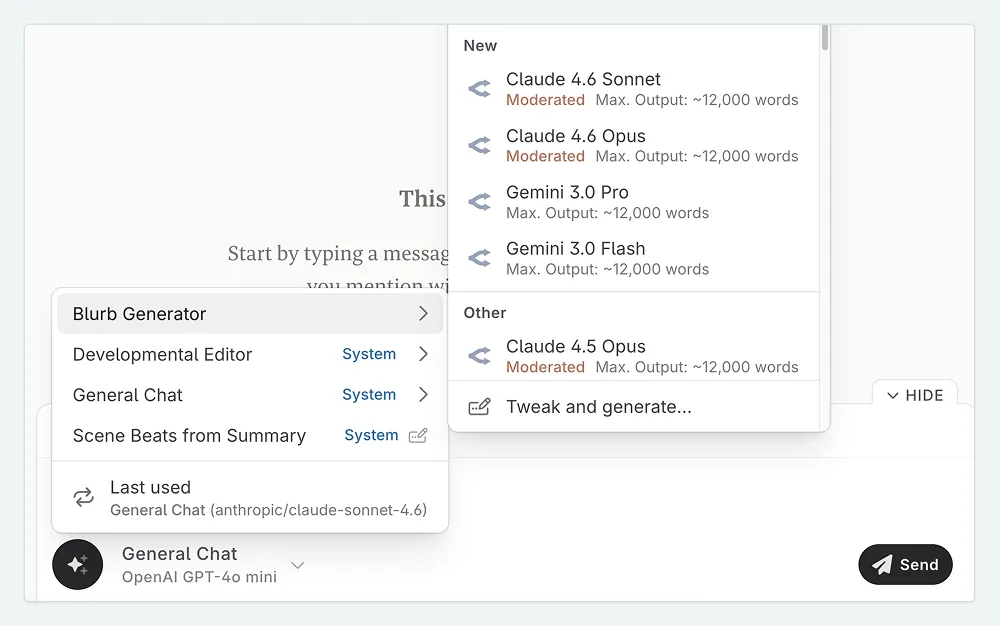
- Open Chat and select the Blurb Generator Preset from the prompt selection.
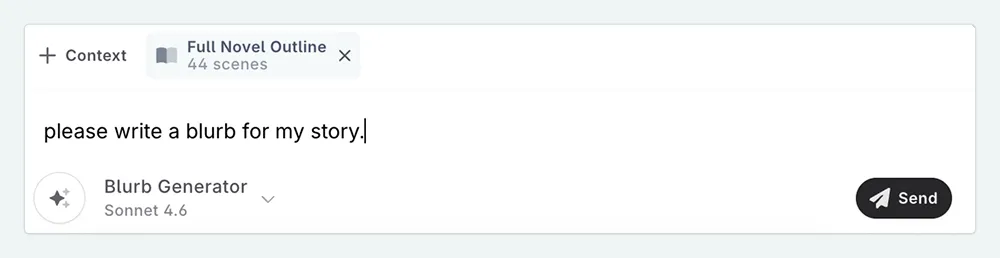
- Add your outline as context by pressing the + Context button. You can also just type your story concept directly into the message that you sent.
- If you are not providing a summary, type something like “Let’s go”, and then press Send .
If you don’t like the blurb that the AI generates, you can ask it to try again, or use the blurb as a starting point, and edit it yourself to make it your own!

I like to continue the conversation, asking the AI to expand on certain points, or to make it more mysterious, or to add more humor, etc. You can also ask the AI to generate blurbs in the style of certain authors, or certain books, to get a better sense of the tone you are going for.
This lesson was taught by:

Kate
Based in the UK, Kate has been writing since she was young, driven by a burning need to get the vivid tales in her head down on paper… or the computer screen.