
- Level:
- Beginner
- Lessons:
- 18 Lessons
Outline Surgical Squad
Analyze and fact-check your book outline.
- Reading Time
- approx. 2 min
Are you ready for an in-depth analysis of your story, having a virtual assistant go over everything with a fine-toothed comb pointing out nit picks or major red flags?
This prompt is best used when you already have a good outline of your story and want to look for:
- Plot holes based on your world building
- Things set up, that you didn’t come back to later
- Weird behavior or tangents that don’t fit your story
- Historical inconsistencies (if applicable)
- and much more!
To get the most out of the prompt, make sure that you have a Codex entry titled “Story Genre”.
Outline Surgical Squad
Learn how to add this prompt to your account here.
How to Use
Prompt Inputs
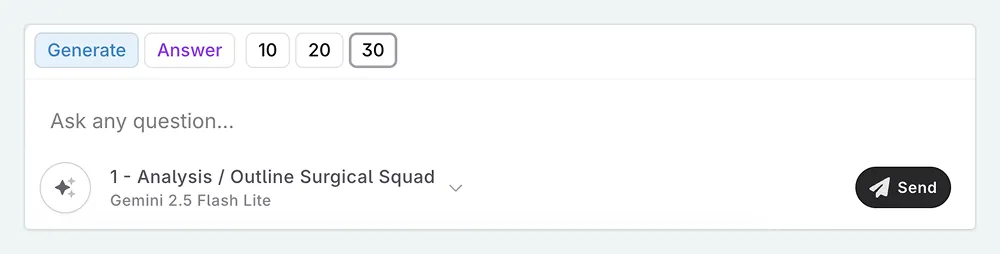
- Mode. Choose whether you want to generate the questions, or for the AI to answer them.
- Number of Questions. Choose how many questions you want the AI to ask.
Using the Prompt
You don’t need to worry about adding your outline as context to the Chat as the prompt automatically does this for you. Simply type in a message like “start” or “generate” to get the AI to start asking you questions about your outline.
You can either answer the questions yourself, or you can change the mode to “Answer” and have the AI answer the questions for you. You can use the AI’s answers as a starting point for your own analysis, or you can use them as a way to see things from a different perspective.
What Model to Use
For this prompt, we recommend using a model that is good at analysis and critical thinking, such as Gemini-3.1, or any thinking model. This will help ensure that the questions generated are insightful and relevant to your story.
If you are on a budget, you can try a more affordable model such as Gemini-3.1-flash-lite, or glm-5-turbo.
For more information on which model to use, check out our writing benchmark site, NC Bench.
This lesson was taught by:

Leonie
Founder of Novelcrafter.