The Mentions Tab
Use the Mentions tab to find every place a Codex entry appears across your project.
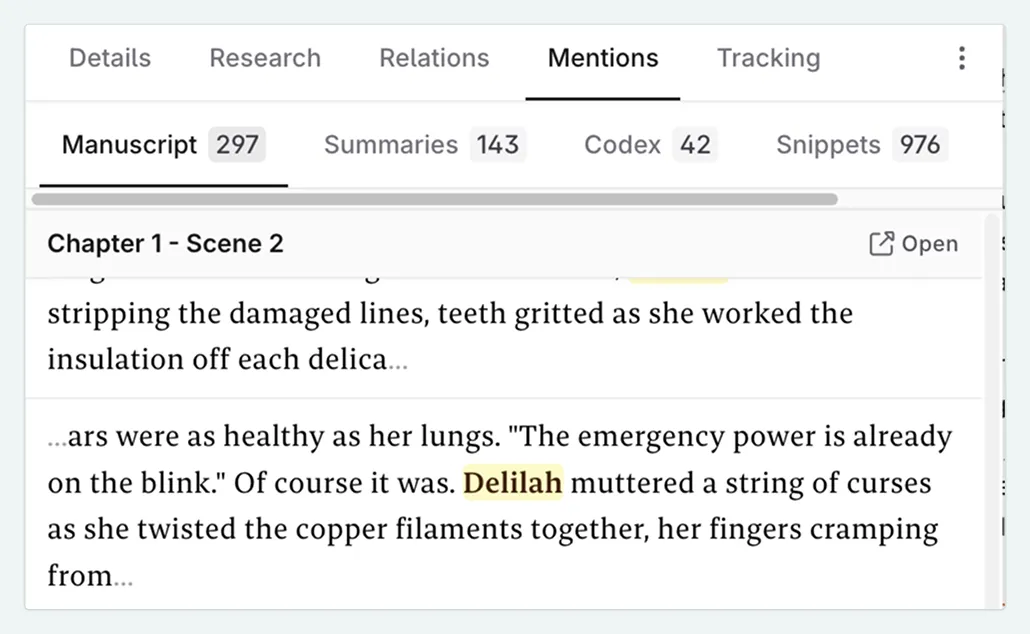
The Mentions tab of a Codex entry lets you find every place where that entry’s name (or any of its aliases) appears across your project. All occurrences are grouped by content type, to allow you to quickly navigate to the relevant scene, snippet, or chat thread.
What is tracked
The Mentions tab collects occurrences from across your project and organises them into the following groups:
| Group | What it includes |
|---|---|
| Manuscript | Every scene in your novel where the entry name or an alias appears in the prose. |
| Scene Summaries | Scene-level summaries (in the Plan) that contain the entry. |
| Codex Entries | Descriptions and details of other Codex entries that reference this entry. |
| Snippets | Any snippet whose content includes the entry name or alias. |
| Chat Threads | Messages in your chat sessions that mention the entry. |
Results are grouped together, and show a snippet of the content where the entry is mentioned, giving you context to its use. Multiple mentions in one scene are shown under a subheading. Click on the Open icon beside that subheading to go to the scene, chat or snippet
How mentions are detected
An occurrence is counted whenever the entry’s name or one of its aliases is found, using the same matching rules configured in the Tracking tab for that entry:
- By default, matching is case-insensitive (e.g. “Goblin” matches “goblin”). If case-sensitive matching is enabled in the Tracking tab, only exact capitalization matches are counted. This is useful for entries that are also common words (e.g. “Red” vs “red”).
- Auto-pluralisation (English only) means standard plural forms are matched automatically (e.g. “Goblin” → “Goblins”). For irregular plurals (e.g. “Wolf” → “Wolves”), you will need to add the plural as an alias.
- Any phrases added to the exclusion list are not counted as mentions.
- If tracking is disabled entirely for an entry, the mentions tab will not appear.
If you add or remove an alias, Codex mentions are updated automatically.
Mentions Tracker in the header
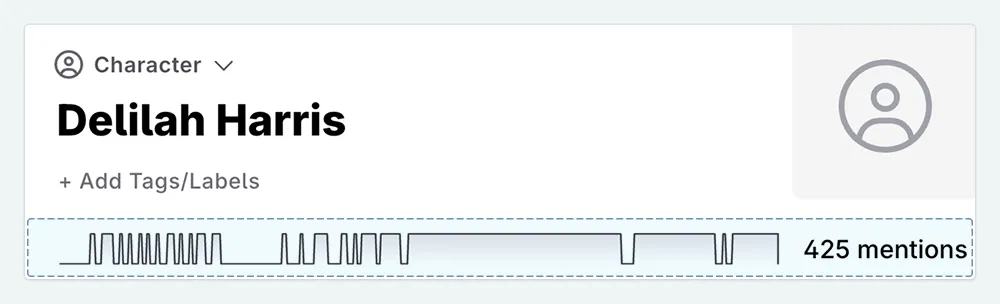
The small bar in the Codex entry header shows the distribution of mentions across your manuscript. A cluster of activity in one area might indicate that a character drops out of the story unexpectedly, or that a location is only relevant in a single act. While the Mentions tab provides a full navigable list, the tracker gives you a quick spatial overview of where the entry is concentrated in your story.
Uses for the Mentions tab
If you are unsure of how to use the Mentions tab, here are some common use cases:
Finding where a Codex entry appears in your manuscript.
Open the entry, click Mentions → Manuscript , and scroll through the results. Each result shows the chapter and scene label plus a text snippet with the matched term highlighted, and an Open button that takes you to that scene.
Checking consistency across your world-building.
The Codex sub-tab shows which other Codex entries reference your current entry. This is useful for spotting outdated descriptions, or for checking that your world-building is consistent across your project.
Tracking a discussion back to a chat thread.
If you brainstormed a character arc or a plot point in Chat and can’t remember which thread it was, the Chat sub-tab will show every thread where the entry was mentioned.